Amazon seller image guide
Amazon Product Image Requirements and Photo Size Guide
The practical size, format, background, and framing rules to check before you upload a product-image set.
Required vs recommended
Separate upload constraints from useful defaults.
Amazon can add category-specific image rules. Treat this as a general listing-image baseline and check the current Seller Central instructions for the product category.
| Check | Required | Recommended or useful |
|---|---|---|
| Pixel dimensions | RequiredThe longest side must be from 500 to 10,000 pixels. | RecommendedUse more than 1,000 pixels where practical to support zoom and useful detail. |
| File format | AcceptedJPEG, TIFF, PNG, or non-animated GIF. | Practical defaultJPEG is usually the simplest photographic output for a listing batch. |
| Main-image background | Main imageUse pure white with RGB values 255,255,255. | ReviewInspect corners, cut-out edges, and cast shadows at full size before upload. |
| Product fill | Main imageFrame the product at roughly 85% of the image area without clipping it. | ReviewLeave enough clean margin to preserve the complete product outline. |
| Shape | No square ruleAmazon does not require every product image to be square or 2000 × 2000. | App defaultThe app prepares a 2000 × 2000 JPEG canvas for a consistent Amazon batch workflow. |
| Visual content | Manual checkApply Amazon's current main-image and category content rules. | ReviewCheck added text, logos, badges, watermarks, props, and product accuracy yourself. |
Do not upscale a small source and treat the new pixel count as new detail. If the original is below the useful zoom range, use a larger original where possible. Resizing can standardise output dimensions but cannot restore missing focus or texture.
Preparation workflow
Build the image set around the main image.
A consistent export is useful, but the main image and alternate images still have different presentation jobs.
-
Start with the largest clean originals
Prefer sharply focused source files above 1,000 pixels so the listing has useful zoom detail. Keep the original folder untouched.
-
Prepare the main image separately
Use pure white RGB 255,255,255, centre the product, aim for roughly 85% fill, and keep the complete product visible.
-
Use alternate images to add context
Show useful angles, details, scale, packaging, and use cases while keeping the item accurate to what the customer receives.
-
Preview every exported file
Check edge quality, colour, crop, text, logos, watermarks, and category-specific instructions before uploading in Seller Central.
Local five-photo checker
Check five Amazon product photos in this browser.
Read dimensions, browser-readable format, and filename locally. Amazon is preselected, and you can compare the same files with all four marketplace presets.
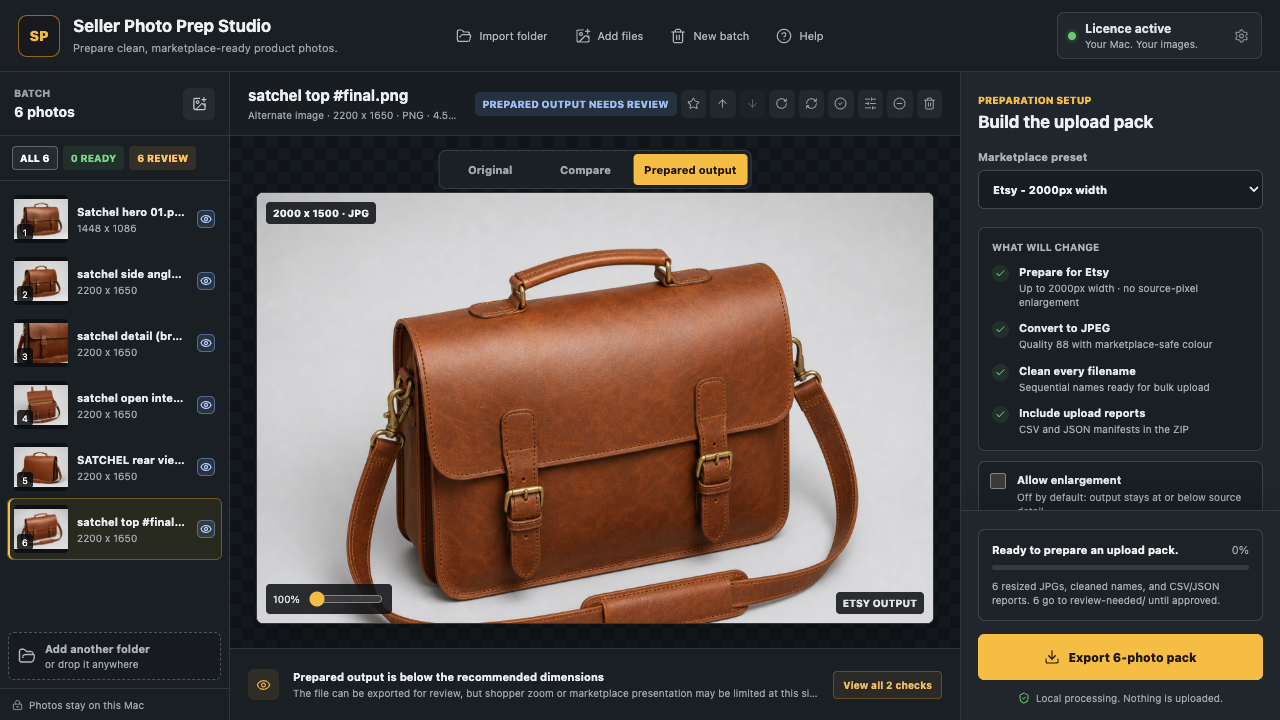
See basic source findings, the app's square JPEG workflow target, and the checks that still need a person.
This quick check reads dimensions, browser-readable format, and filename only. It does not inspect image content, perform OCR or watermark detection, certify compliance, or guarantee Amazon acceptance. The 2000 × 2000 JPEG result is an app workflow default, not an Amazon requirement.
Scope and limitations
Use automation for preparation, then review the listing as a seller.
The browser checker and Mac app can organise repeatable technical work. Neither can make Amazon's final content or acceptance decision.
What the app checks
- The browser checker reads image dimensions, JPEG/PNG/WebP format, and filename without uploading the files.
- The Mac app prepares its 2000 × 2000 Amazon JPEG workflow, cleans filenames, and keeps the original folder unchanged.
- The Mac app adds deeper subject, background, duplicate, and export checks to help prioritise review.
- Export reports record prepared files and files that still need attention.
Manual review
- Confirm the main background is truly RGB 255,255,255 and the product occupies roughly 85% without clipping.
- Seller Photo Prep Studio has no OCR or watermark-detection feature. Inspect added text, logos, badges, and watermarks yourself.
- Check product accuracy, props, category-specific rules, colour, focus, edge quality, and alternate-image content.
- Review the final files in Seller Central. A preparation result is not a compliance certificate or acceptance guarantee.
Primary references
Official Amazon sources
- Amazon Seller Central: Product image requirements (G1881) Primary technical reference for the 500–10,000-pixel longest-side range, accepted file types, and main-image rules. Seller Central may require sign-in.
- Sell on Amazon: product photography guidance Amazon's public guidance on white backgrounds, product fill, image quality, and using more than 1,000 pixels for zoom.
Marketplace documentation can change, and product categories can add rules. Recheck the current Seller Central page before a production upload.
iPhone, iPad and Mac
Prepare the full folder locally.
Seller Photo Prep Studio checks, renames, previews, and exports up to 500 product photos on your Mac. Use the Amazon preset as a repeatable preparation workflow, then perform the required human review.
See the terms, EULA, cancellation, and refund information for the direct Mac edition. The app does not guarantee marketplace acceptance.
Amazon image FAQ
Specific answers before upload.
Need an app fit check? Email support@vaultdevlabs.com.
What size should Amazon product images be?
Amazon Seller Central G1881 states that the longest side must be between 500 and 10,000 pixels. More than 1,000 pixels is useful for zoom, but image size alone does not determine whether Amazon will accept the file.
Does Amazon require 2000 x 2000 images?
No. Amazon does not require a square 2000 x 2000 image. Seller Photo Prep Studio uses 2000 x 2000 JPEG as its Amazon workflow default so batches have a consistent output canvas.
Which product image file formats does Amazon accept?
Amazon accepts JPEG, TIFF, PNG, and non-animated GIF product images. JPEG is generally the most practical default for photographic listings.
Does Seller Photo Prep Studio guarantee Amazon acceptance?
No. The app provides preparation checks and export tools, not a compliance certificate. Amazon can apply category-specific rules and makes the final upload decision.
Can the app detect text or watermarks in Amazon images?
No. The app does not perform OCR or watermark detection. Added text, logos, badges, and watermarks require manual visual review.